On or about 12/9/2014, Microsoft released a Windows Update for all machines greater and equal to Windows 7, KB3004394.

If you have installed this update, I strongly recommend you remove it as soon as possible.

Through my own testing (and confirmation from various sites whose links I will post below) I can confirm two things:

1) Installing KB3004394 on a machine that has Media Center Extenders attached to it will break the extender functionality.
2) Installing KB3004394 on a Windows 7 machine -can- result in being unable to do any more Windows Updates.

Intrigued? Read on.

I installed KB3004394 on 12/9/2014, as part of my usual bi-weekly update schedule (and also because I was re-imaging my desktop).

I installed it on all my computers (1 Desktop, 2 Laptops, 1 Tablet, 1 HTPC) and on all of them running Windows 7 I started encountering major problems.

I installed it on my HTPC which has a Ceton Echo and an Xbox 360 as a Media Center Extender attached to it for the purposes of watching TV. After the update was installed, I found that upon starting the Extender, I would get the “Windows Media Center” screen and then nothing but a black display. I could still move about the menus (as indicated by the audio playing and what not) but you could not see anything. Uninstalling KB3004394 per these threads (One, Two) and all of a sudden my Extenders were working again.

I installed it on my Desktop which was just freshly rebuilt (I got in on a 480 GB SSD on Amazon!) and all of a sudden I could not install ANY other Windows updates because of error 800706F7.  Looking into the error code in Event Viewer and I saw that it was not able to communicate or properly secure the download of the new updates.  Thanks to my roommate Nick he found that a bunch of other people were having problems with KB3004394 preventing updates (One, Two, Three).  I uninstalled KB3004394 immediately and now my desktop updates properly.

It is very telling that Microsoft has already pulled KB3004394 from Windows Update — you cannot get it from there anymore.

That being said, they can’t fix it with Windows Update because you won’t be able to download any new updates.  You HAVE to manually uninstall KB3004394 to get it back.

Good grief.  Poor quality control and assurance at its finest.
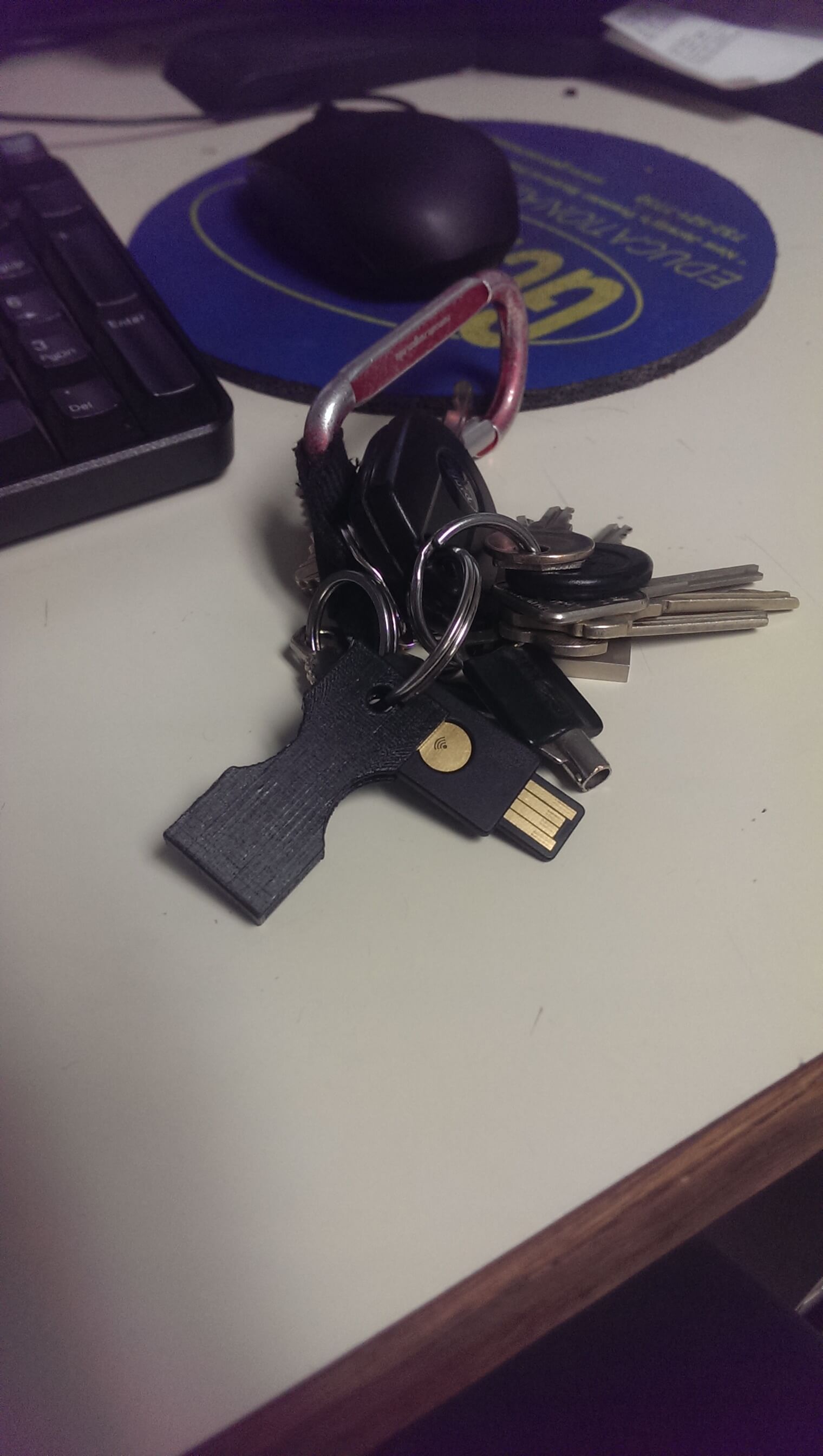
I recently picked up a Yubikey Neo from Amazon, jumping early on the bandwagon of U2F for Google.

2014-11-18 14.57.31

After a few weeks I am pleased report that it is  amazingly versatile and I have been able to do many great things with it.

I have already setup U2F with Google (replacing Authenticator altogether) which is amazing.  My WordPress site also integrates the Yubikey One-Time-Password scheme (which is frustrating to get working when I did it, more on that below).  I have also replaced the Authenticator App on my phone with the YubiAuth App.  They do the same thing, except with one major difference: Authenticator shows codes immediately; YubiAuth does not show codes until you tap the YubiKey to your phone (with NFC enabled).  This means codes aren’t available to just anyone.  As an added bonus, since the auths are stored on the YubiKey you don’t need to worry about losing your phone and losing access.  Get a new phone, install the YubiAuth app, tap your Yubikey, boom, codes are available.  It’s a big relief for me since rooting a phone to install a Titanium Backup copy of Google Authenticator is always step one when I get a new phone.  Don’t need to worry about that anymore! Score!

The configuration tools aren’t quite there yet.  When I first wrote this, the tools were limited in their scope until you went to the command line versions.  For example, the Yubikey supports OTP, Smart Card, and U2F.  It doesn’t support all three simultaneously nor natively.  Using the basic GUI tools you cannot enable U2F and OTP simultaneously.  That being said, using the command line tool allows you to enable mode 6 which is all three modes at the same time.  It’s a little confusing, and sometimes frustrating (especially when trying to set up SmartCard or OTP and realizing being in mode 6 prevents enrolling almost all the time) but once you get the knack of it, things work very well.

The Yubikey system integrates fairly well with LastPass (as reported by Nick) and does well with Dashlane as well (in that the YubiAuth app replaced Google Authenticator for new device enrollment in my Dashlane account).  I used it to sign in to my desktop briefly, but it didn’t work the way I wanted and prevents RDP as far as I can tell.  The Yubikey must be present in the system for you to login, but it still requires your Windows password to be entered.  I was hoping that merely putting in the Yubikey would allow me to login (or pressing the OTP generator would log me in).  You CANNOT log in to the system enrolled with their login system unless the key is present.  No more RDP or TeamViewer access meant it just wasn’t viable for me.  Still, I could see it being used at work (though enrolling for a domain user was damn tricky since the program doesn’t sort the usernames in any semblance of an order).

My one real complaint about the Yubikey was the case they sent; namely the lack of a case.  They ship the Yubikey in a small envelope made of a flexible plastic type material, which isn’t really suitable for holding the unit on a keychain (which is where it’s basically designed to go).  I know they claim that it’s made of super resilient materials, but I am trusting my virtual identity to the device, and if it fails then I am in DEEP trouble (I am still keeping a backup of my Google Authenticator and also leaving back-doors into systems so that I can get back in if shit hits the fan).

That being said, I did also design a cool, simple case for the Yubikey, which is available on Thingiverse here.  If you have a Makerbot, the STL file is available which will allow you to import it directly into Makerware.  If you have another 3D Printer I have also included the SKP file (Sketchup) which should get you in the right direction for printing it.  The model was made with help of the NetFabb Model Repair Service, a Pittsburgh Caliper, and a lot of time on my end. 🙂

So, if you’re security minded I highly recommend you pickup one of the Yubikey line and get your accounts well secured. 🙂

Holy Shit We Landed a Spacecraft on a Comet | WIRED.

YAY SCIENCE!

Also, America take note: Europe is surpassing our space program.  Sure, we landed on the moon (YAY! MOON!) but the moon is a large body that has a relatively uniform and stable orbit.

They landed on a COMET.  A relatively small comet, at that.  Sure, they had some problems, like the landing grapple harpoons haven’t fired.  But it’s there! Doing SCIENCE.

Are you REALLY telling me that if an Armageddon scenario happens we’re gonna depend on Europe?  I think we can do better America.  I know we can do better.

Let’s get on that right away.

Update: If you haven’t seen this GIF, you really should look.  It shows just how much science and planning was put into getting that lander there.  Fans of Kerbal Space Program take note: this is what we simulate!

The Lander as It Travels Through the Solar System (GIF)

avZGG4q_460sa_v1

POLICE: ‘Apple Will Become The Phone Of Choice For The Pedophile’ – Business Insider.

I think I have a better title: POLICE: We don’t know how the law or technology works, BUT PEDOPHILES ARE SCARY SO THIS IS BAD

Christ and hunter.

It should not be EASY for ANYONE to get complete access to someone’s personal information on any device, let alone a cell phone.

We let you pull the wool over our eyes once, “ZOMG TERRORISTS” is not enough justification, nor is “ZOMG SAFETY”.  Not anymore.

We’ve learned, and it’s about time.

I’m usually the first one to rag on Apple, but this is a VERY smart move and I applaud them for it.

That being said, how about those bendy iPhone 6+’s? (I can’t let it all be positive…)

Link to DFS Framework posted for commentary here.

Let’s go on with some of the basic things:

Section 200.3 License, section (a):

License required.  No person shall, without a license obtained from the superintendent as provided in this Part, engage in any Virtual Currency Business Activity.

Orrrrr basically taking a form of currency which is free and open to all, and thereby locking it behind closed, controlled doors.  You’re clearly missing the point here NY.  Part of the reason we like Crypto Currency is that we DON’T need to ask your permission to have it or use it.  Crypto Currency is OURS, not YOURS.

Section 200.8 Capital Requirements, section (a):

Each Licensee shall maintain at all times such capital as the superintendent determines is sufficient to ensure the financial integrity of the Licensee and its ongoing operations. In determining the minimum amount of capital that must be maintained by a Licensee, the superintendent will consider a variety of factors

So now if I have $1000USD in Dogecoin, I need to have some percentage of that set aside in real USD before I can use it?  YOU’RE MISSING THE POINT.

There is so much more in this document which is just damningly ignorant about technology as a whole and Crypto Currency specifically.

It’s becoming increasingly apparent that government entities are afraid of crypto.  They should be.  It removes them from the process.

And if government doesn’t have a hand in our money, then what real power do they have anymore?

None that matters, anyway.

Hopefully this will get struck down as over-reaching.  Otherwise crypto development will leave NY (and the USA eventually) and go to more forward-thinking countries.  Stop trying to hold us back.  THIS IS THE FUTURE!

Comcast is turning your Xfinity router into a public Wi-Fi hotspot [Updated] – Dwight Silverman’s TechBlog.

I’m not saying this is illegal, but what I am saying is how the hell can they justify it being opt-out instead of opt-in?

You’re charging me a metric buttload of money for your service (which is, with all regards, pretty craptacular) and then using my electricity to provide free, public access wireless networks without my permission?

Using potentially my bandwidth (the copper can only provide so much, with TV and my internet access and now someone else’s internet access) and not giving us anything in return?

Pretty ballsy Comcast.  Pretty ballsy.

It's a bold move!

Normally I’m pretty open to cool features, and I grant that it’s an opt-in kind of thing, but nevertheless.

If a feature is in the application, then it can and will be abused.  This kind of stuff should not a part of any app.  As much as I enjoy having Facebook on my phone, I will gladly get rid of it if for nothing else to keep them from inadvertently recording what I’m saying.

Users slam ‘creepy’ new feature that allows Facebook to listen in | News.com.au.

Please take the time to write to the FCC (and call, if you are so inclined!) to tell them what you think of their views on Net Neutrality – Save the internet as we know it.

Video: Time to Lock Caps and Save the Internet | Free Press.

Click here for an easy to use form which will be filed in FCC Docket 14-28.

Click here to go directly to the FCC and file an entry manually.

Either way, it’s once again time to stand and be counted.

Defend the internet as we know it, before they destroy even more of it.