Last week I wrote about my Kindle Fire 5th Gen and getting custom launchers, root, and the Google Play Store (you know, all the goodness that is SUPPOSED to come with an Android tablet but was mysteriously missing from the Amazon Kindle because reasons). I had also mentioned that I was kind of disappointed with the custom ROM support (I have had 3 Android phones in the last 6 years: HTC Evo 4G (the original Evo!), HTC One M7, and a OnePlus One); all of these phones pretty well supported custom ROMs with unlockable bootloaders. I was expecting the same from the Amazon Kindle. Boy, was I wrong.
Category: Technology
Kindle Fire 7″ 5th Gen: Root, Custom Home Screen, Etc
Recently I picked up a Kindle Fire 7″ 5th Gen from Best Buy because they were on sale. I love reading (both books and magazines) and honestly: it’s a super convenient little tablet. For what I paid for it ($40 or so) I couldn’t be happier.
Or so I thought.
Apple “Fixes” Error 53
But in an odd way.
Reporting from TechCrunch we see that Apple has gone ahead and made an update (9.2.1) for their iPhone devices with 3rd-party-replaced Home Buttons and Screens.
In case you missed the gaffe, any person who had a 3rd-party shop replace their screen or home button and then attempted to do the latest iOS update (primarily via iTunes) they received an error 53 during the update, and an extra Apple-branded extra: a bricked phone. Literally bricked. You couldn’t go back. You couldn’t go forward. You couldn’t even start your phone. Their devices showed “Connect to iTunes” permanently. Connecting their device to a PC with iTunes reported “Error 53” for infinity. There was simply NOTHING they could do.
Apple has gone back and released a software update which will get you back to a working state, with one caveat: you will LOSE TOUCH ID.
The FBI and Apple: Who Wins?
The FBI demand for Apple to unlock Those-Who-Shall-Not-Be-Named’s iPhones (the San Bernardino shooters) has officially been ruled on by a federal judge. The verdict is in: Apple must give investigators access to the encrypted data on the iPhone used by the shooters. (Link)
But wait, there’s more! The FBI demand (apparently) includes a demand that Apple help decrypt the data. This is something that Apple steadfastly (rightly so) claims to not have the ability to do. The FBI claims that Apple simply MUST have that ability, and lacking that ability currently, must develop such a method to do so (if you believe Tim Cook, which I do in this case).
FBI Finally Investigating Hillary Clinton’s Private Email Server
Original Articles: MSNBC, CNBC, Business Insider, Washington Free Beacon
Well, this is a long time coming in my book. Just wow. We first learned that Hillary Clinton ran a private email server where she was corresponding with people about government matters while she was the Secretary of State in March (or so) of 2015. It is now February 2016. That is almost a full year of “What the hell were you doing FBI?!?” I really don’t understand why this took so long to get any sort of meaningful announcement from the FBI. A former inspector general was reported to have indicated in this New York Post article claims that Hillary “never set up an agency email address for her in the first place” – this would mean that any and all communication she was doing as the Secretary of State via email had to be on these insecure channels (namely her private email server).
Phone Encryption: Your Best Friend
Recently I’ve heard of a few states (NY and CA, I’m looking in your direction) thinking about outright banning the sale of phones that are capable of encrypting phone contents. Specifically they claim that the state (namely the police) should have the ability to decrypt and access all the contents of your personal mobile devices (because reasons). Interestingly enough though, these two states have taken the stance of punishing the seller, not the user (this is a common theme in law). That means that Apple, Google, and Microsoft (and all other cell phone manufacturers like LG, HTC, OnePlus; and all cell phone providers like Verizon, T-Mobile, Sprint) would be unable to sell their equipment in NY and CA (or face stiff penalties of up to $2,500 in the case of CA). These penalties would be retroactive (how is that even legal???) back to January 1st, 2016. I don’t see how any of this makes any sense.
Look, I get it. Law enforcement agencies exists to arrest and subsequently convict people of crimes (under the pretense of the greater public welfare and trust). Law enforcement needs information to make their cases as air-tight as possible. Law enforcement also understands that people have their lives on their phones. Law enforcement therein made the (what I can only assume they thought to be) logical jump to say: we need complete and unrestricted access to cell phone contents. I do not see how a cell phone (and it’s contents) are not protected by the 4th Amendment of the Constitution of the United States. The police cannot just barge into your home (without a warrant) and root around for anything that might be suspected of being used in a crime. Even more than that, even if they do get a warrant it has to be very specific (at least in theory; in practice lately this does not seem to be the case, but that isn’t really in the purview of this discussion) or else the results of the search can be entered as inadmissible.
Encryption is a natural backlash to a string of perceived slights from the public by law enforcement. Encryption simply denies access to the information by anyone without the access code. The Supreme Court has recently decided that the 5th Amendment applies to your access codes to your devices. This means that if your phone is encrypted you cannot be legally coerced into providing your password. Therefore, an encrypted device would be largely inaccessible to law enforcement. I can see why they’d be bothered by this. What I can’t see is how they have any legal basis to declare that encryption is inherently bad (unless in their hands).
Encryption is your final line of defense against people who would use your mobile phone and the data therein to build a case against you (even for something you may not have initially been suspected of). You should be using it (and there are instructions later in this post about getting it done) for your own (and for your contacts) well being and protection. It also has the handy ability to make your phone a paperweight upon being stolen (most devices encrypt the bootable partitions of the device, meaning you must enter the decryption code before the device will even start up, meaning you cannot even format it or recover the device without the code.
The funny part is these laws supposedly would apply to goods purchased outside of the state and shipped in as well, but not to goods you physically purchase in another state and then transport into the other state by hand. This means you would not be able to buy an Apple phone in NY, or via Amazon shipped into NY, but you would be able to drive into NJ, buy the phone, then drive back. Are they seriously trying to kill their own tax revenues by limiting technology sales? That seems like a recipe for disaster.
All things considered: I am not surprised by NY claiming that encryption is evil and that police should have access to your data at all times.
I am, however, completely surprised (and taken aback) by CA making the same claim. I wonder how Apple and Google feel about their headquarters states now? It astounds me that a state so rife with technology can be so utterly left in the dark ages via their politics.
And if these states honestly expect Apple and Google to stop full device encryption then I think those states are definitely in for a rude awakening (assuming the bill even passes, which I doubt will happen). Apple’s CEO Tim Cook challenged this anti-encryption mentality in early 2015 with his statements: ““history has shown us that sacrificing our right to privacy can have dire consequences.” I am honestly surprised that the heads of Google and Microsoft haven’t come out with a similar statement or sentiment. Regardless I have no doubt that any company would be willing to forgo the sales in a particular state (knowing full well that someone who wants their device would just go a state over to get it).
Whatever the case may end up being one thing is clear: 2016 is going to be an interesting year for encryption technology and end user rights.
For your information:
- iPhone
- Android
- Windows Phone
Arduino D&D Project: Attribute Roller
So I’ve been playing a lot of Dungeons and Dragons lately (and I mean, a lot. 2-3 hours a day, 4-5 days a week) and it got me to thinking: As much as I like rolling the dice sometimes it is just easier to have a thing that does it for you. There are plenty of websites that will do a dice roll, and even different kinds of dice rolling. It isn’t all that difficult in actuality to program a computer to do this. Even Google’s search will respond to “Roll a dice” and the like.
Well, Dan got me the Sunfounder Super Kit (which happens to include a handy-dandy display ) for my Arduino Uno R3 which got me thinking: I bet I can make my Arduino roll dice for me. Let’s start with a simple one (this is going to be an ongoing series I think, as I keep coming up with extra things to implement): rolling for attributes.
A Word on Power & Your Laptop
So for a while at the office we’ve had a VERY annoying problem with some of our higher-end laptops we use for STEM classes. It’s a problem that hasn’t really been reported by the end users, only by us in the Tech Office directly. We have some Dell Precision M2800s with rather decent specs (which I won’t delve much into right now) except to say they do have marvelous 256GB Solid-State Drives installed in them.
When we first got them, we marveled at the speed of the devices. They were blazing fast. Everyone at the office wanted one. We were strangely confused to some problems deploying a few packages but largely chalked it up to problems with the imaging servers (which were getting a little on the old side).
A few weeks after that we had to re-image the first one and the problems became evident. Jobs that took ~5 minutes to run on a different model laptop were taking 30 minutes to run on these (beefier) laptops. We were at a loss.
That being said, we largely pushed the problem aside (because there are bigger fish to fry on any given day!). Today we had some time to delve into it, and we figured it out real quick all things considered. I’ll let you see the picture which is probably enough proof.
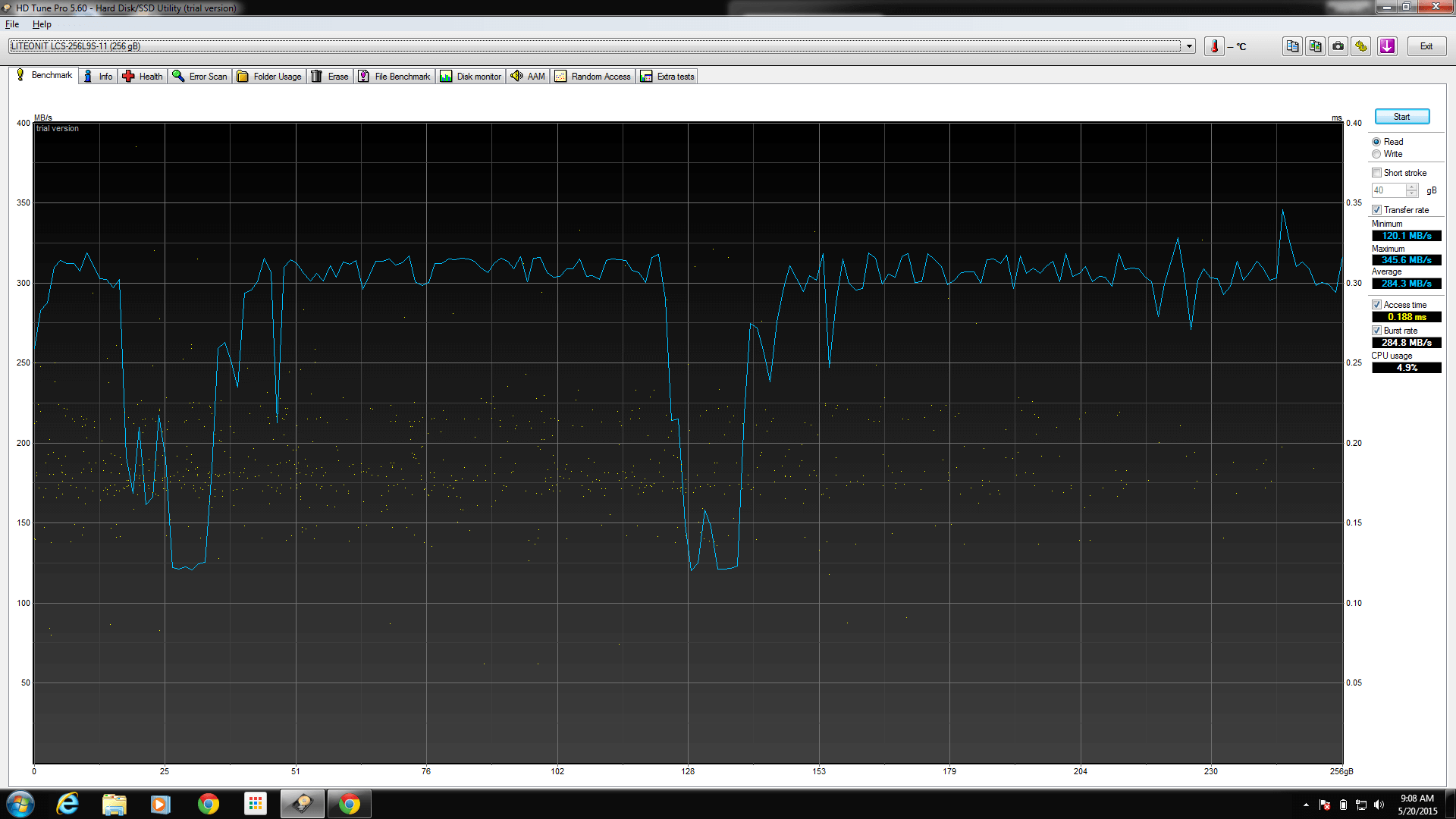
Figured it out yet? Hint: power! Still nothing? Ok.
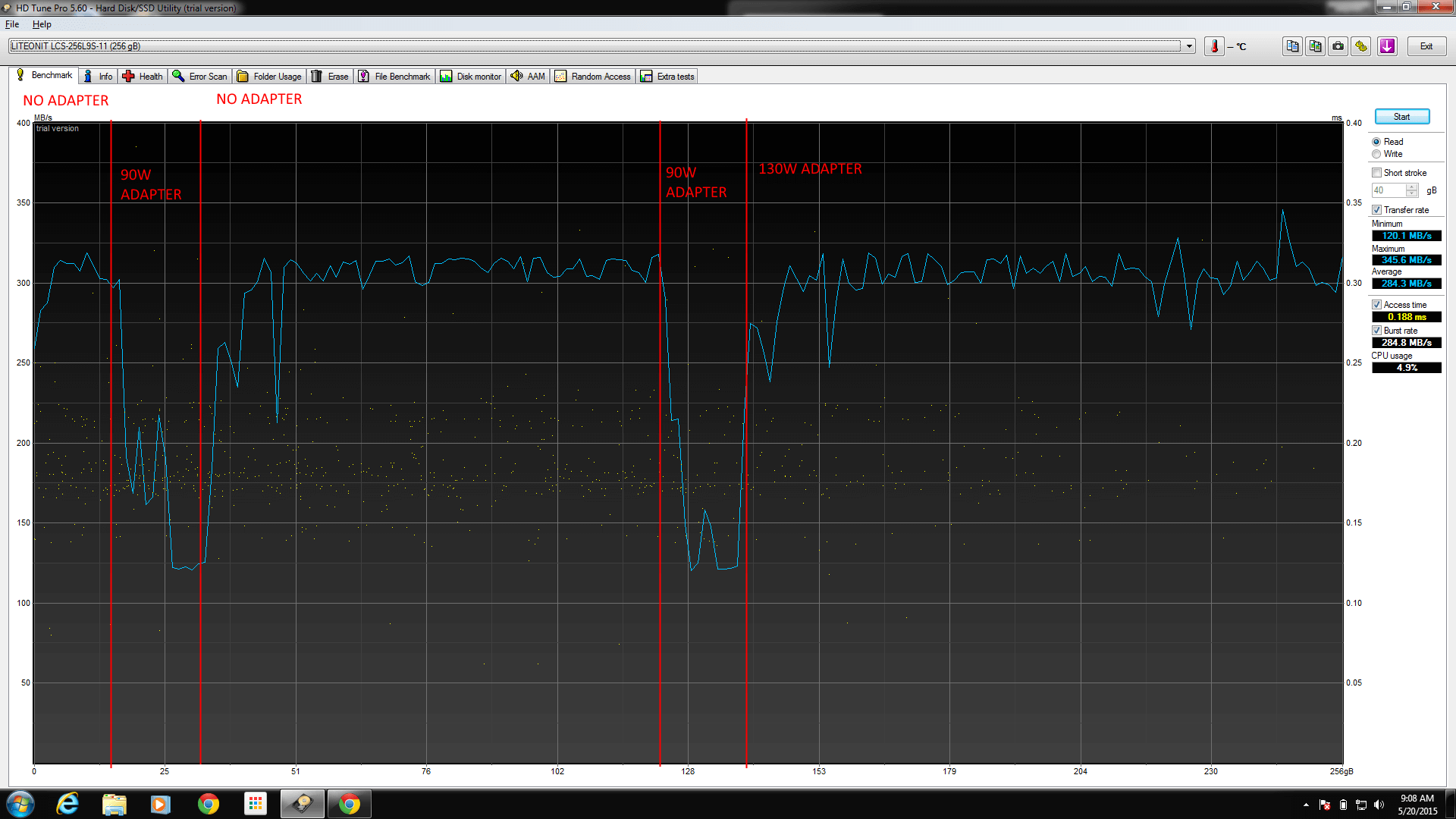
That’s right.
Using any AC adapter below 130W on the M2800 will result in the machine yelling at you during power up, for good reason. It’s not powerful enough.
If you use a 65W or a 90W AC adapter, the drive (and CPU) both clock themselves down in order to get the battery to charge.
Frustrating, to say the least. “OMG, DUH” as my coworker politely put it.
The moral of the story: Use the wattage that came with your laptop, or you might experience otherwise un-explainable performance drops.
God damn, we are the dumbest smart people I know.
Setting Up A Zabbix 2.4 Server for Monitoring
For a long time we had been using Nagios for monitoring services and equipment in our shop. During one of our I.T. services commission meetings a discussion about monitoring came up and a bunch of ideas were thrown around. We talked about the advantages and disadvantages of a base Nagios installation like we were using (managing devices, templates, etc is not exactly easy since it’s a bunch of text files). A number of names for replacements were dropped by the other I.T. managers and my boss suggested I take a look and see if any of them could do the job we needed.
Suggestions included Nagios & Cacti with Weathermap Plugin, Eyes of Network, PRTG, and Zabbix. After looking at all the options, I found Zabbix to be the easiest to get rolling (which turned out to be wrong!) so I went with it. I spent about a week setting up the VM and it was going great, until I added some switches and enabled SNMP Discovery for Interfaces. Suddenly, the server slammed to a halt. Processes were flying through the roof, the server itself was overloaded, and the housekeeper process was stuck at 100% use for over 4 hours a time, every hour. Doing some digging on the Zabbix forums I discovered that there are a LOT of configuration tweaks that should be done in order to keep the machine happy.
To that end, I decided to write up a guide about how to get an optimal setup (it has been working SO much better for me). I’ll also briefly touch on making Zabbix communicate with Cachet for a public landing page.
- Install and configure an instance of Ubuntu x64 Server edition (in this case, Ubuntu 14.04 LTS)
- For reference, the specifications I used were:
- RAM: 8 GB
- CPU: 4 CPUs, 2 Cores
- Storage: 128 GB
- Be sure to install SSH Server and LAMP Server during the installation process.
- For reference, the specifications I used were:
- Do updates (always a good idea as a general rule of thumb):
sudo apt-get update && sudo apt-get upgrade - Now we need to configure the SQL Server
- Enable innodb_file_per_table
- sudo nano /etc/mysql/my.cnf
- Under the [mysqld] heading, add the line:
innodb_file_per_table
- Generic tweaks
- From this link we gathered the following tweaks for the my.cnf, again under the [mysqld] heading:
- innodb_buffer_pool_size = 4G (set this to 50% RAM if running the entire server on this box, 75% if you’re only running the database on this box).
- innodb_buffer_pool_instances = 4 (change to 8 or 16 on MySQL 5.6)
- innodb_flush_log_at_trx_commit = 0
- innodb_flush_method = O_DIRECT
- innodb_old_blocks_time = 1000
- innodb_io_capacity = 600 (400-800 for standard drives, >= 2000 for SSD drives)
- sync_binlog = 0
- query_cache_size = 0
- query_cache_type = 0
- event_scheduler = ENABLED
- Run the MySQL Tuner utility
- wget https://raw.githubusercontent.com/major/MySQLTuner-perl/master/mysqltuner.pl
- chmod +x mysqltuner.pl
- ./mysqltuner.pl
- We can ignore the query_cache_type (we set it to 0 for a reason)
- Ignore InnoDB is enabled but isn’t being used ( we don’t have any tables yet!)
- Ignore -FEDERATED (this is deprecated in MySQL > 5.5)
- Ignore Key buffer hit rate (since we JUST started the server)
- Keep in mind, this utility is best used after you’ve got some data in your tables.
- From this link we gathered the following tweaks for the my.cnf, again under the [mysqld] heading:
- Enable innodb_file_per_table
- Get and install the Zabbix Server and Agent
- wget http://repo.zabbix.com/zabbix/2.4/ubuntu/pool/main/z/zabbix-release/zabbix-release_2.4-1+trusty_all.deb
- sudo dpkg -i zabbix-release_2.4-1+trusty_all.deb
- sudo apt-get update
- sudo apt-get install zabbix-server-mysql zabbix-frontend-php zabbix-agent
- Time to do the Web Installation
- sudo nano /etc/php5/apache2/php.ini
- Uncomment ;date.timezone =
- Set date.timezone appropriately (for me: “America/New_York”)
- sudo service apache2 restart
- Now do the web installation. That part you can do without me guiding you through it. 🙂
- Test your login with admin/zabbix.
- sudo nano /etc/php5/apache2/php.ini
- Setup partitioning of the SQL instance
- There’s a guide for it here.
- mysql -u <your mysql login> -p (login appropriately)
- use zabbix;
- ALTER TABLE housekeeper ENGINE = BLACKHOLE;
- From the “Getting ready” section:
- ALTER TABLE `acknowledges` DROP PRIMARY KEY, ADD KEY `acknowledges_0` (`acknowledgeid`);
- ALTER TABLE `alerts` DROP PRIMARY KEY, ADD KEY `alerts_0` (`alertid`);
- ALTER TABLE `auditlog` DROP PRIMARY KEY, ADD KEY `auditlog_0` (`auditid`);
- ALTER TABLE `events` DROP PRIMARY KEY, ADD KEY `events_0` (`eventid`);
- ALTER TABLE `service_alarms` DROP PRIMARY KEY, ADD KEY `service_alarms_0` (`servicealarmid`);
- ALTER TABLE `history_log` DROP PRIMARY KEY, ADD INDEX `history_log_0` (`id`);
- ALTER TABLE `history_log` DROP KEY `history_log_2`;
- ALTER TABLE `history_text` DROP PRIMARY KEY, ADD INDEX `history_text_0` (`id`);
- ALTER TABLE `history_text` DROP KEY `history_text_2`;
- ALTER TABLE `acknowledges` DROP FOREIGN KEY `c_acknowledges_1`, DROP FOREIGN KEY `c_acknowledges_2`;
- ALTER TABLE `alerts` DROP FOREIGN KEY `c_alerts_1`, DROP FOREIGN KEY `c_alerts_2`, DROP FOREIGN KEY `c_alerts_3`, DROP FOREIGN KEY `c_alerts_4`;
- ALTER TABLE `auditlog` DROP FOREIGN KEY `c_auditlog_1`;
- ALTER TABLE `service_alarms` DROP FOREIGN KEY `c_service_alarms_1`;
- ALTER TABLE `auditlog_details` DROP FOREIGN KEY `c_auditlog_details_1`;
- Create the managing partition table:
- CREATE TABLE `manage_partitions` (
`tablename` VARCHAR(64) NOT NULL COMMENT ‘Table name’,
`period` VARCHAR(64) NOT NULL COMMENT ‘Period – daily or monthly’,
`keep_history` INT(3) UNSIGNED NOT NULL DEFAULT ‘1’ COMMENT ‘For how many days or months to keep the partitions’,
`last_updated` DATETIME DEFAULT NULL COMMENT ‘When a partition was added last time’,
`comments` VARCHAR(128) DEFAULT ‘1’ COMMENT ‘Comments’,
PRIMARY KEY (`tablename`)
) ENGINE=INNODB;
- CREATE TABLE `manage_partitions` (
- Create the maintenance procedures
- Guide here, we need the “Stored Procedures”.
-
DELIMITER $$
CREATE PROCEDURE `partition_create`(SCHEMANAME VARCHAR(64), TABLENAME VARCHAR(64), PARTITIONNAME VARCHAR(64), CLOCK INT)
BEGIN
        /*
           SCHEMANAME = The DB schema in which to make changes
           TABLENAME = The table with partitions to potentially delete
           PARTITIONNAME = The name of the partition to create
        */
        /*
           Verify that the partition does not already exist
        */

        DECLARE RETROWS INT;
        SELECT COUNT(1) INTO RETROWS
        FROM information_schema.partitions
        WHERE table_schema = SCHEMANAME AND TABLE_NAME = TABLENAME AND partition_description >= CLOCK;

        IF RETROWS = 0 THEN
                /*
                   1. Print a message indicating that a partition was created.
                   2. Create the SQL to create the partition.
                   3. Execute the SQL from #2.
                */
                SELECT CONCAT( "partition_create(", SCHEMANAME, ",", TABLENAME, ",", PARTITIONNAME, ",", CLOCK, ")" ) AS msg;
                SET @SQL = CONCAT( 'ALTER TABLE ', SCHEMANAME, '.', TABLENAME, ' ADD PARTITION (PARTITION ', PARTITIONNAME, ' VALUES LESS THAN (', CLOCK, '));' );
                PREPARE STMT FROM @SQL;
                EXECUTE STMT;
                DEALLOCATE PREPARE STMT;
        END IF;
END$$
DELIMITER ;
-
DELIMITER $$
CREATE PROCEDURE `partition_drop`(SCHEMANAME VARCHAR(64), TABLENAME VARCHAR(64), DELETE_BELOW_PARTITION_DATE BIGINT)
BEGIN
        /*
           SCHEMANAME = The DB schema in which to make changes
           TABLENAME = The table with partitions to potentially delete
           DELETE_BELOW_PARTITION_DATE = Delete any partitions with names that are dates older than this one (yyyy-mm-dd)
        */
        DECLARE done INT DEFAULT FALSE;
        DECLARE drop_part_name VARCHAR(16);

        /*
           Get a list of all the partitions that are older than the date
           in DELETE_BELOW_PARTITION_DATE.  All partitions are prefixed with
           a "p", so use SUBSTRING TO get rid of that character.
        */
        DECLARE myCursor CURSOR FOR
                SELECT partition_name
                FROM information_schema.partitions
                WHERE table_schema = SCHEMANAME AND TABLE_NAME = TABLENAME AND CAST(SUBSTRING(partition_name FROM 2) AS UNSIGNED) < DELETE_BELOW_PARTITION_DATE;
        DECLARE CONTINUE HANDLER FOR NOT FOUND SET done = TRUE;

        /*
           Create the basics for when we need to drop the partition.  Also, create
           @drop_partitions to hold a comma-delimited list of all partitions that
           should be deleted.
        */
        SET @alter_header = CONCAT("ALTER TABLE ", SCHEMANAME, ".", TABLENAME, " DROP PARTITION ");
        SET @drop_partitions = "";

        /*
           Start looping through all the partitions that are too old.
        */
        OPEN myCursor;
        read_loop: LOOP
                FETCH myCursor INTO drop_part_name;
                IF done THEN
                        LEAVE read_loop;
                END IF;
                SET @drop_partitions = IF(@drop_partitions = "", drop_part_name, CONCAT(@drop_partitions, ",", drop_part_name));
        END LOOP;
        IF @drop_partitions != "" THEN
                /*
                   1. Build the SQL to drop all the necessary partitions.
                   2. Run the SQL to drop the partitions.
                   3. Print out the table partitions that were deleted.
                */
                SET @full_sql = CONCAT(@alter_header, @drop_partitions, ";");
                PREPARE STMT FROM @full_sql;
                EXECUTE STMT;
                DEALLOCATE PREPARE STMT;

                SELECT CONCAT(SCHEMANAME, ".", TABLENAME) AS `table`, @drop_partitions AS `partitions_deleted`;
        ELSE
                /*
                   No partitions are being deleted, so print out "N/A" (Not applicable) to indicate
                   that no changes were made.
                */
                SELECT CONCAT(SCHEMANAME, ".", TABLENAME) AS `table`, "N/A" AS `partitions_deleted`;
        END IF;
END$$
DELIMITER ;
-
DELIMITER $$
CREATE PROCEDURE `partition_maintenance`(SCHEMA_NAME VARCHAR(32), TABLE_NAME VARCHAR(32), KEEP_DATA_DAYS INT, HOURLY_INTERVAL INT, CREATE_NEXT_INTERVALS INT)
BEGIN
        DECLARE OLDER_THAN_PARTITION_DATE VARCHAR(16);
        DECLARE PARTITION_NAME VARCHAR(16);
        DECLARE LESS_THAN_TIMESTAMP INT;
        DECLARE CUR_TIME INT;

        CALL partition_verify(SCHEMA_NAME, TABLE_NAME, HOURLY_INTERVAL);
        SET CUR_TIME = UNIX_TIMESTAMP(DATE_FORMAT(NOW(), '%Y-%m-%d 00:00:00'));

        SET @__interval = 1;
        create_loop: LOOP
                IF @__interval > CREATE_NEXT_INTERVALS THEN
                        LEAVE create_loop;
                END IF;

                SET LESS_THAN_TIMESTAMP = CUR_TIME + (HOURLY_INTERVAL * @__interval * 3600);
                SET PARTITION_NAME = FROM_UNIXTIME(CUR_TIME + HOURLY_INTERVAL * (@__interval - 1) * 3600, 'p%Y%m%d%H00');
                CALL partition_create(SCHEMA_NAME, TABLE_NAME, PARTITION_NAME, LESS_THAN_TIMESTAMP);
                SET @__interval=@__interval+1;
        END LOOP;

        SET OLDER_THAN_PARTITION_DATE=DATE_FORMAT(DATE_SUB(NOW(), INTERVAL KEEP_DATA_DAYS DAY), '%Y%m%d0000');
        CALL partition_drop(SCHEMA_NAME, TABLE_NAME, OLDER_THAN_PARTITION_DATE);

END$$
DELIMITER ;
-
DELIMITER $$
CREATE PROCEDURE `partition_verify`(SCHEMANAME VARCHAR(64), TABLENAME VARCHAR(64), HOURLYINTERVAL INT(11))
BEGIN
        DECLARE PARTITION_NAME VARCHAR(16);
        DECLARE RETROWS INT(11);
        DECLARE FUTURE_TIMESTAMP TIMESTAMP;

        /*
         * Check if any partitions exist for the given SCHEMANAME.TABLENAME.
         */
        SELECT COUNT(1) INTO RETROWS
        FROM information_schema.partitions
        WHERE table_schema = SCHEMANAME AND TABLE_NAME = TABLENAME AND partition_name IS NULL;

        /*
         * If partitions do not exist, go ahead and partition the table
         */
        IF RETROWS = 1 THEN
                /*
                 * Take the current date at 00:00:00 and add HOURLYINTERVAL to it.  This is the timestamp below which we will store values.
                 * We begin partitioning based on the beginning of a day.  This is because we don't want to generate a random partition
                 * that won't necessarily fall in line with the desired partition naming (ie: if the hour interval is 24 hours, we could
                 * end up creating a partition now named "p201403270600" when all other partitions will be like "p201403280000").
                 */
                SET FUTURE_TIMESTAMP = TIMESTAMPADD(HOUR, HOURLYINTERVAL, CONCAT(CURDATE(), " ", '00:00:00'));
                SET PARTITION_NAME = DATE_FORMAT(CURDATE(), 'p%Y%m%d%H00');

                -- Create the partitioning query
                SET @__PARTITION_SQL = CONCAT("ALTER TABLE ", SCHEMANAME, ".", TABLENAME, " PARTITION BY RANGE(`clock`)");
                SET @__PARTITION_SQL = CONCAT(@__PARTITION_SQL, "(PARTITION ", PARTITION_NAME, " VALUES LESS THAN (", UNIX_TIMESTAMP(FUTURE_TIMESTAMP), "));");

                -- Run the partitioning query
                PREPARE STMT FROM @__PARTITION_SQL;
                EXECUTE STMT;
                DEALLOCATE PREPARE STMT;
        END IF;
END$$
DELIMITER ;
-
DELIMITER $$
CREATE PROCEDURE `partition_maintenance_all`(SCHEMA_NAME VARCHAR(32))
BEGIN
                CALL partition_maintenance(SCHEMA_NAME, 'history', 28, 24, 14);
                CALL partition_maintenance(SCHEMA_NAME, 'history_log', 28, 24, 14);
                CALL partition_maintenance(SCHEMA_NAME, 'history_str', 28, 24, 14);
                CALL partition_maintenance(SCHEMA_NAME, 'history_text', 28, 24, 14);
                CALL partition_maintenance(SCHEMA_NAME, 'history_uint', 28, 24, 14);
                CALL partition_maintenance(SCHEMA_NAME, 'trends', 730, 24, 14);
                CALL partition_maintenance(SCHEMA_NAME, 'trends_uint', 730, 24, 14);
END$$
DELIMITER ;
-
- Guide here, we need the “Stored Procedures”.
- Create the new timing event
- DELIMITER $$
CREATE EVENT IF NOT EXISTS `zabbix-maint`
ON SCHEDULE EVERY 7 DAY
STARTS ‘2015-04-29 01:00:00’
ON COMPLETION PRESERVE
ENABLE
COMMENT ‘Creating and dropping partitions’
DO BEGIN
CALL partition_maintenance_all(‘zabbix’);
END$$
DELIMITER ; - This will run the partition maintenance procedure on all tables in Zabbix every 7 days (creating 14 days of future partitions as well)
- DELIMITER $$
- Tweak the Zabbix instance
- Disable Housekeeping in Config -> General -> Housekeeping
- Install snmp utilities
- sudo apt-get install snmp snmp-mibs-downloader
- Tweak the Zabbix config files
- sudo nano /etc/zabbix/zabbix_server.conf
- Fix number of pingers: option StartPingers = 20 (we have 350 hosts currently, with 20 pingers, this yields ~10.52% utilization of the Pingers)
- Fix number of db syncers: option StartDBSyncers = 4
- Enable SNMP Checks: StartSNMPTrapper = 1
- Increase CacheSizes
- CacheSize = 1G
- HistoryCacheSize = 256M
- TrendCacheSize = 256M
- HistoryTextCacheSize = 128M
- ValueCacheSize = 256M
- Prepare the server for maximum cache size increase
- sudo nano /etc/sysctl.conf
- Add: kernel.shmmax = 1342177280
- sudo nano /etc/zabbix/zabbix_server.conf
- Optional: Enable ldap
- sudo apt-get install php5-ldap
- sudo service apache2 restart
- Getting Zabbix to throw data to Cachet
- Create a file “notifyCachet” in /usr/lib/zabbix/alertscripts
- #!/bin/bash
to=$1
compID=$2
statusID=$3#Comment this next line out for Production environments
#echo “curl -H ‘Content-Type: application/json’ -H ‘X-Cachet-Token: <your cachet API token>’ http://<cachet server ip>/api/components/$compID -d ‘{“status”:$statusID}’ -X PUT”#Uncomment this next line for Production
curl -H ‘Content-Type: application/json’ -H ‘X-Cachet-Token: <your cachet API token>’ http://<cachet server ip>/api/components/”$compID” -d “{‘status’:$statusID}” -X PUT
- #!/bin/bash
- From Zabbix: go to Admin -> Media Types -> Create Media Type
- Set Name to whatever
- Type is Script
- Script Name is “notifyCachet”
- Go to Config -> Actions -> Create Action
- Action Settings:
- Default/Recovery Subject: {$CACHET}
- Default Message: 4 (A major outage)
- Recovery Message: 1 (Operational)
- Conditions: Add Trigger Severity >= Average
- Operations: Add a User Group, Send ONLY to Cachet_Notify (from Section 8, Subsection 2, Section 1)
- Action Settings:
- In all Hosts for Cachet, you MUST set a Macro {$CACHET} where the value is the Cachet ID Number
- Create a file “notifyCachet” in /usr/lib/zabbix/alertscripts
I know, this is a lot of stuff to process, but honestly it’s worth going through and setting it up properly. Zabbix is running flawlessly for us right now. This is a bit messy right now (yay wordpress) so in a day or so here’s a PDF version of the guide.
Cheers,
-M
The Problem With Technology “Awards”
8th Annual Crunchies Awards – San Francisco – February 5, 2015 | TechCrunch.
Normally I’m pretty neutral when it comes to Tech Awards by websites, but this year I am paying attention (mostly to vote in OnePlus as a recent company because I am in love with the OnePlus One phone I got).
As I was looking through the awards, I came across “Best Technology Achievement”.
On the list is, of course, “Apple Pay”. I won’t doubt that Apple Pay is a pretty good thing.
But “Best Technology Achievement” ? What the hell. Google Wallet has been out for far longer and does it much better. For all the Crunchies I’ve seen so far, Google Wallet wasn’t on the list in any of the previous years. It’s truly maddening.
I’ll hear complaints of the following kind:
Apple Pay is more secure because TouchID! Well, TouchID is broken and was pretty much immediately after being announced. Google Wallet requires a PIN, which while only 4 characters, is still pretty good.
Device support is limited for Google Wallet! Well, yes, because Android devices aren’t limited to the flavor-of-the-month Apple device. That being said, if you buy a $100 phone without NFC, you can’t use Google Wallet. That’s a given. In fairness, you’re not getting a $100 iPhone any time soon, so… That’s not really a fair comparison, is it? Didn’t think so.
—
Google Wallet works damn near everywhere that has NFC enabled readers, which is becoming even more common. And guess what? If they don’t have NFC enabled readers you can go ahead and get the Google Wallet card which has the added benefit of being a physical card that you can swipe anywhere, thus preventing 3rd-parties from getting your real Credit Card number.
The only thing that Apple Pay has done better than Google Wallet is the damn advertisement. Google Wallet isn’t really known outside the Android user-base.
It’s frustrating to see Apple getting credit where Google is; honestly though we’ve come to expect that. Super frustrating, but exactly what is wrong with Technology “Awards” done by websites using 3rd-party entrant lists (Crunchies are user-submitted).
Go figure.